Data Collection & Telemetry
Overview
Update Hardware
Module and SIM Update Guides
Module Identification
Module Swap Wizard
SIM Swap Wizard
AT&T / T-Mobile Configuration Guide
Verizon Configuration Guide
Worldwide H1 SIM Configuration Guide
SIM Replacement Instructions
Wi-Fi Configuration Guide
Firmware Update
Troubleshoot
ZL6 Troubleshooting Guide
ATMOS 41W Troubleshooting Guide
EM60G Troubleshooting Guide
EM50 Series Troubleshooting Guide
Communication Test
List Cellular Carriers
Test Button & Status Lights
Fix: Retroactively Enable LTE-M Bands for 4G in Europe
Sensor Current Draw Check - ZSC
App Location Permissions on iOS and Android
Coverage
Accessories
ZENTRA Cloud 1.0
Quick Start
Organizations
Account
Edit Account Profile
Update Account Password
Lost Password/Password Reset
Set Measurement Unit Preferences
Users
Devices
Device Inventory
Edit Device
Re-provision ZL6 to European Server
Add Device
Remove Device
Time-zone and Location Override
Calibrations
Downloads
Dashboard
Enable Chart Status
Create Custom Charts
Color Picklist
Add Traces to Chart
Chart Stats
Print Charts
Set a Target Range
Lock Chart Axes
Chart Date Range Picker [NEW]
Download Chart Data
Notifications
Models
Daily Light Integral
Ground Water Elevation
Ground Water Depth
Plant Available Water
Daily Light Photoperiod
Chill Hours
Growing Degree Days
Create a Model
Evapotranspiration
Subscriptions
Error Codes
Applications
FAQ
ZENTRA Field
ZENTRA Cloud 2.0
Frequently Asked Questions
Introduction to 2.0
Getting Started
User Account
Setup
Loggers
Add Data Logger
Configure Data Logger
Device Map
Data Logger Charts
Download Data Logger
Logs
Archive
Handhelds
Dashboards
Explorer
Data
Workspaces (Projects)
Alerts
Environment Models
Chill Hours [2.0]
Daily Light Integral [2.0]
Daily Light Photoperiod [2.0]
Evapotranspiration [2.0]
Groundwater Elevation [2.0]
Groundwater Depth [2.0]
Growing Degree Days [2.0]
Heat Index [2.0]
Heat Stress Wet Bulb Globe Temperature WBGT [2.0]
Leaf Wetness Amount of Water [2.0]
Plant Available Water [2.0]
Utah Chill Model [2.0]
Wind Chill [2.0]
Subscriptions
Feedback
API
v3.0/4.0
US Server API
EU Server API
TAHMO Server API
Push API
R Package
API Troubleshoot
AgWeatherNet & DAS
Manage API Keys
v5.0
Metadata
Release Notes
Accessibility
Security
Uptime & Incidents
Legal
- All Categories
-
- EM50 Firmware Update
EM50 Firmware Update
If the data logger firmware is out of date, use ECH2O Utility to start a firmware update.
Use ECH2O Utility to update the firmware on your EM50 series data logger.
ECH2O Utility
- Connect to the data logger with ECH2O Utility.
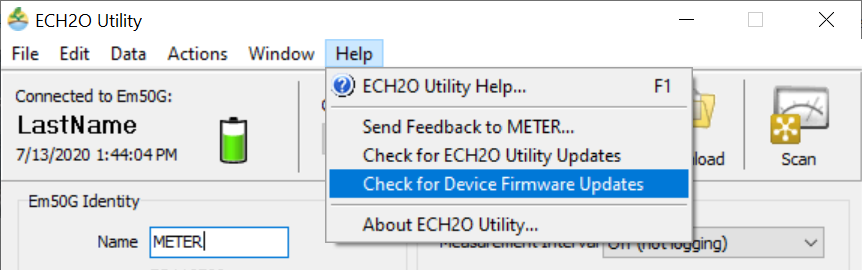
- Click Help in the Menu bar and select Check for Device Firmware Updates.
- Click Update Now to start the update.
- The update can take 3-5 minutes.
- After the update is finished, you will have to reconnect to the data logger.
Steps
How did we do?